AP Automation
AP Automation for Enterprise ERP Environments
AP automation is the use of software to move an invoice from arrival to ERP posting without manual re-keying. Drelo.ai handles the document and data side of that process — intake, capture, validation, matching and ERP integration — so your AP team spends its time on exceptions and approvals instead of typing.
What is AP automation?
AP automation is the automation of the accounts payable process: receiving supplier invoices, extracting their data, checking that data against your own records, matching it to purchase orders and receipts, routing anything unusual for human decision, and posting the result into the ERP with an audit trail behind it.
It is a process discipline, not a single feature. Three things decide whether it works in an enterprise: whether every intake channel is covered, whether validation is strict enough that posted data can be trusted, and whether exceptions reach the right person quickly.
What it typically replaces
- ·Manual keying of invoice headers and line items into the ERP
- ·Spreadsheet tracking of which invoices are waiting on which approver
- ·Email threads used as an approval record
- ·Per-vendor templates that break whenever a supplier changes layout
- ·Reconciliation work discovered only at period close
How Drelo supports AP automation
Drelo.ai is positioned between your suppliers and your ERP. It takes in invoices from every channel, produces one validated invoice record per document or message, and hands that record to the ERP. Approval policy, payment execution and banking stay where they already live — typically in the ERP or treasury system.
Where Drelo fits
Between invoice arrival and ERP posting. It owns intake, capture, validation, matching preparation and integration.
Where Drelo does not decide
Approval authority, payment runs and bank execution remain with your finance systems and policies.
What the AP team keeps
Judgement: price disputes, unexpected quantities, new vendors, blocked invoices, approvals.
What the ERP receives
Structured, checked data in the shape the ERP expects, with the source document linked to it.
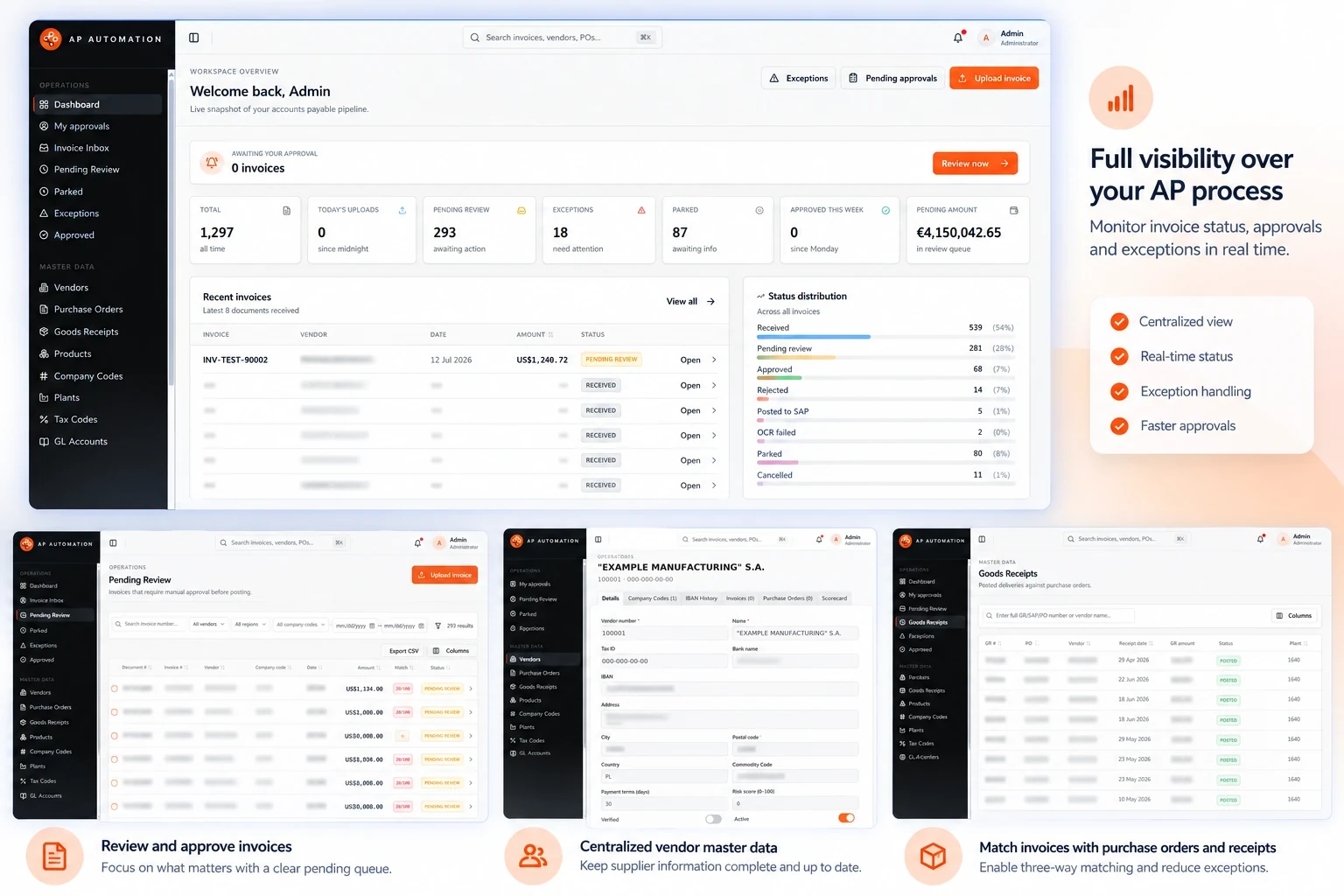
The AP process flow
The sequence below is the shape of the process. How much of each step runs without a person depends on your rules, your data quality and the scope you configure — a strict validation policy deliberately sends more invoices to review, and that is usually the correct trade-off early in a rollout.
- PDF and scans
- EDI messages
- Email and portal uploads
Header and line-item fields are read from the document or message.
Checks against vendor master, PO data, tax and GL rules.
Two-way or three-way matching against purchase orders and receipts.
Exceptions and approvals handled by the people who own them.
- Validated, structured data
- Source document linked
Each stage hands a single invoice record to the next. Anything that fails a check stops at review instead of continuing to the ERP.
Invoice intake
Intake is where most AP automation projects succeed or fail. If a channel is not covered, the invoices arriving through it stay manual, and the reported benefit never materialises.
Structured invoices
Structured invoices arrive as machine-readable messages — EDIFACT INVOIC, ANSI X12 810 and similar formats — where fields are already defined by the standard. The work here is mapping, segment interpretation and partner-specific conventions rather than reading a layout.
Unstructured and semi-structured invoices
PDF invoices, scans and emailed documents carry the same commercial content in a visual layout that differs per supplier. These are read field by field — invoice number, dates, vendor identifiers, tax amounts, totals and line items — and normalised into the same record shape as the structured messages.
Each captured invoice is checked before anything is passed on. A failing check produces an exception instead of a posting.
- ·Vendor identity
- ·Arithmetic and tax
- ·Duplicates
- ·Required fields and references
The invoice is compared with what was ordered and, where applicable, what was received, within agreed tolerances.
- ·Two-way against the PO
- ·Three-way with goods receipt
- ·Tolerance handling
Exceptions carry their failure reason to a reviewer. Approval authority stays with your policy and your finance systems.
- ·Reason-coded exceptions
- ·Approval on validated data
- ·Every action recorded
The sections below describe each of these steps in detail.
Validation and exception handling
Validation is the step that makes automation safe. Each captured invoice is checked before anything is passed on, and a failing check produces an exception rather than a posting.
- ·Vendor identity: does the invoice map to a known vendor record?
- ·Arithmetic: do line items, tax and totals reconcile?
- ·Duplicates: has this invoice number already been seen for this vendor?
- ·Required fields: are the fields your ERP needs actually present?
- ·Tax and currency: are the codes valid for the entity and country?
- ·Reference data: does the PO, cost centre or GL account referenced exist?
Exceptions are held with the reason recorded, so the reviewer sees what failed rather than rechecking the whole document. Common causes are price or quantity differences against the PO, an unknown vendor, a missing PO reference, or an invoice that duplicates one already received.
Matching
Matching compares the invoice against what was ordered and, where applicable, what was received. Two-way matching aligns the invoice with the purchase order. Three-way matching adds the goods receipt. Tolerances define how much difference is acceptable before an invoice is treated as an exception.
Matching quality depends on your own data as much as on the software: PO references on supplier invoices, consistent unit handling, and a clean vendor master all raise the share of invoices that clear without review.
Approval processes
Approval is an organisational rule, not a document problem. Drelo.ai prepares the invoice so that an approval decision can be made on validated data, and routes the cases that require a decision. Thresholds, delegation and segregation of duties remain governed by your policy and the systems that enforce it.
- ·Invoices that pass validation and matching need no approval chase
- ·Exceptions carry their failure reason to the reviewer
- ·Every action taken on an invoice is recorded for audit
- ·Source documents stay linked to the posted record
ERP integration
The output of AP automation is only useful if the ERP accepts it. Drelo.ai targets the ERP you already run rather than asking you to change systems, delivering the fields, codes and document structure that ERP expects for an incoming invoice.
- ·Field-level mapping to the target ERP's invoice structure
- ·Entity, company code and currency handling for multi-entity groups
- ·Consistent handling of tax codes, GL accounts and cost objects
- ·Traceability from the posted document back to the original invoice
Invoice data is prepared in the vocabulary of your own landscape — company codes, vendor master data, document types and account determination.
Structured EDI messages and PDF or scanned invoices are treated as inputs to one invoice record, so rules and mapping are defined once.
Every invoice keeps its history: what arrived, what was captured, which checks ran, which failed, who acted and what was posted.
SAP environments
SAP landscapes carry their own vocabulary and constraints: company codes, vendor master data, purchasing documents, tax determination and document-type rules. Drelo.ai is built by a team whose background is SAP and EDI integration work, so invoice data is prepared in SAP terms rather than translated at the last moment.
Practically, that means the mapping conversation happens in your own SAP configuration — the company codes, document types and account determination your team already maintains.
EDI and document invoices
Most enterprises receive both. Large strategic suppliers send EDI; the long tail sends PDFs. Running two disconnected processes for the two channels creates duplicate exception queues and inconsistent reporting.
Drelo.ai treats both channels as inputs to one invoice record, so validation rules, exception handling and ERP mapping are defined once. The channel-level mechanics are covered in more depth on the invoice automation page.
Auditability
Every invoice keeps its history: what arrived, what was captured, which checks ran, which failed, who acted, and what was posted. That record is what makes the process defensible at audit, and it is also what makes a rollout measurable — you can see where invoices actually stop.
Implementation approach
A realistic rollout narrows scope first, then widens it once the exception rate is understood.
- ·Scope: one entity, one ERP target, an agreed set of channels and vendors
- ·Mapping: ERP fields, tax and GL logic, vendor master alignment
- ·Rules: validation checks, matching tolerances, exception routing
- ·Pilot: real invoices processed alongside the existing process
- ·Review: exception reasons examined and rules tuned
- ·Extension: additional vendors, entities, channels or ERP targets
Timelines depend on how clean your vendor and PO data is and how many approval paths exist. Data cleanup is normal project work, not a sign the approach is wrong.
Frequently asked questions
Is AP automation the same as invoice automation?
No. AP automation covers the whole accounts payable process — intake, validation, matching, approval, posting and audit trail. Invoice automation is the narrower part that turns invoice documents and EDI messages into clean, structured data. Most organisations start with invoice automation and extend outward.
Does AP automation replace the AP team?
No. It removes repetitive keying and reconciliation work, and leaves judgement work — disputes, unusual pricing, approval decisions, vendor relationships — with the AP team. Exceptions are routed to people rather than hidden.
Do we need to change our ERP?
No. Drelo.ai is designed to sit in front of the ERP you already run and deliver validated data into it, including SAP environments and other major ERPs.
What happens to invoices that fail validation?
They become exceptions with the failing check recorded, and are routed for review instead of being posted. Nothing reaches the ERP until the exception is resolved.
How long does an implementation take?
Scope drives the answer. A typical first scope — one entity, one ERP target, a defined set of vendors and channels — is planned in weeks rather than months. Multi-entity or multi-ERP rollouts are phased.
Can it handle both EDI invoices and PDF invoices?
Yes. Structured EDI messages such as EDIFACT INVOIC and ANSI X12 810 and document invoices such as PDFs and scans both end up in the same validated invoice record. See the invoice-level detail on the invoice automation page.
Discuss your AP process
Tell us which channels, ERP and entities are in scope, and we will walk through where Drelo.ai fits.